 English
Similar Spellings & Word Variations
Find words with similar spelling and different forms, even when they do not exactly match your search.

Search file contents, not just file names. Find names, numbers, and phrases across documents and entire folders, even if you don't remember the exact word. All processing happens locally on your device.
 Add to Chrome


 Requires Google Chrome to be installed, works offline.
 Computer Access

 Background processing and direct access to each file’s folder from search results.
Start with the words you remember. Whirlpool looks for exact matches and related terms across your entire computer.
Find words with similar spelling and different forms, even when they do not exactly match your search.
Discover words with related meanings to help you find passages that use different vocabulary.
Find details in scanned records with OCR and see the matching text highlighted on the document.
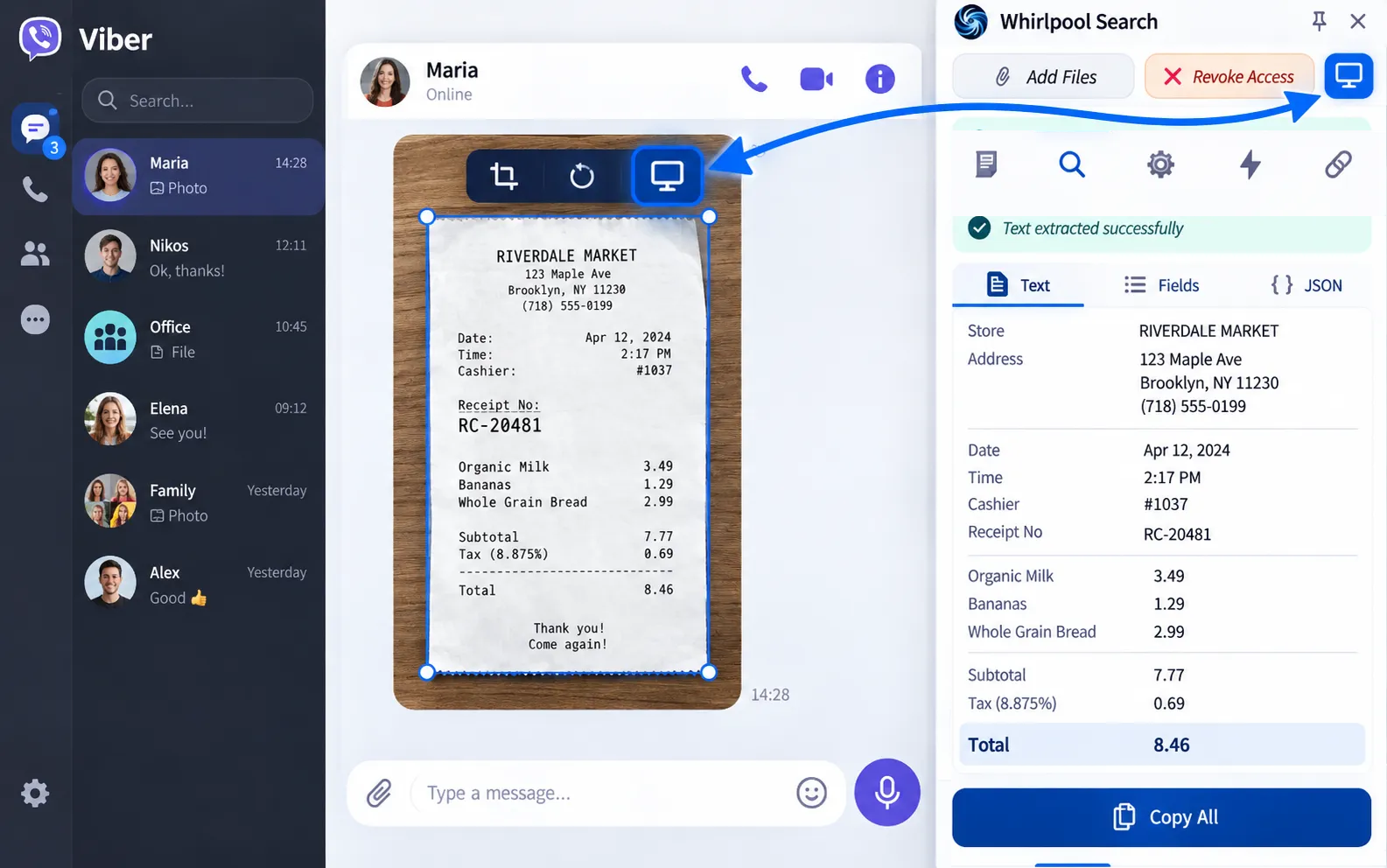
Click the Move button to transfer the image you found from the sidebar to the website where you want to use it.
Bring entire folders and thousands of documents into one searchable collection. Whirlpool brings their information together so you can find similar words and related terms across all your files in one search.
 Images
 Scanned Documents
 Engineering Drawings
 Word (DOC / DOCX)
 Excel (XLS / XLSX)
 PowerPoint (PPT / PPTX)
 Logs
LogsChoose the files and folders you want to include. Adjust the similarity score to broaden your search.
Bring PDFs, Word documents, spreadsheets, presentations, text files, and images from multiple folders into one workspace. Keep adding files while processing continues and search across the whole collection together.
Find a customer, company or document number in contracts and invoices. Scanned documents, including scanned invoices, and photos are also supported.
Search for a name across different files without opening every document individually.
Find invoice numbers, customer codes and payment references across your collection.
Search attachments across all your email accounts at once. Connect Outlook or Gmail to Whirlpool through a secure, authenticated connection.
Whirlpool can retrieve your email attachments so you can search them alongside your local files.
 Outlook
 Gmail
Gmail Google Drive
 OneDrive
Your files are processed entirely on your computer to protect your privacy. Remote files are accessed directly from your browser through the email service's REST API. For more information, see our privacy policy.

Select text on a receipt, an image or a paused video frame. OCR recognizes the characters so you can copy and paste them wherever you need them, with support for 15 languages.
 Bulgarian
 Danish
 English
 French
 German
 Greek
Greek
 Hebrew
 Hungarian
 Indonesian
 Japanese
 Portuguese (Brazil)
 Romanian
 Simplified Chinese
 Spanish (Spain)
 Turkish
Locate your files➜
Turkish
Locate your files➜

Whirlpool runs as a native Windows application and works with the corresponding browser extension, so you can locate your files in File Explorer.
Computer Access
Background processing and direct access to each file’s folder from search results.
Illustrative experiences, not verified customer reviews.
It found files I could never find before. Honestly, it's scary how much it uncovers.
I spent days looking for an international certificate. Whirlpool found it without me opening every file.
Finding client bills and invoices is so much easier. It saves me searching through folders one by one.
I don't want to upload my clients' files to AI platforms. With Whirlpool, I search them right on my computer.
I can search all my selected files together. I no longer need to remember which document contains what I need.
It recognized the document and text in my drawings. I found an old client’s drawing in seconds.
From text extraction to instant document search. Simple, fast tools designed to help you work more efficiently every day.
Add to Chrome
Requires Google Chrome to be installed, works offline.